
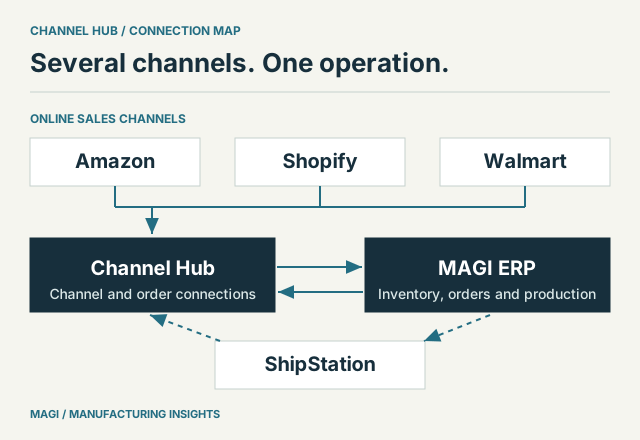
01 / KEEP THE CHANNEL IDENTITY
Several storefronts still draw on one manufacturing business
A manufacturer may sell to distributors, take orders through its own Shopify store and offer products on Amazon or Walmart. Each route has its own order identifiers, product listings and customer expectations. The stock, factory capacity and people behind those orders are often shared.
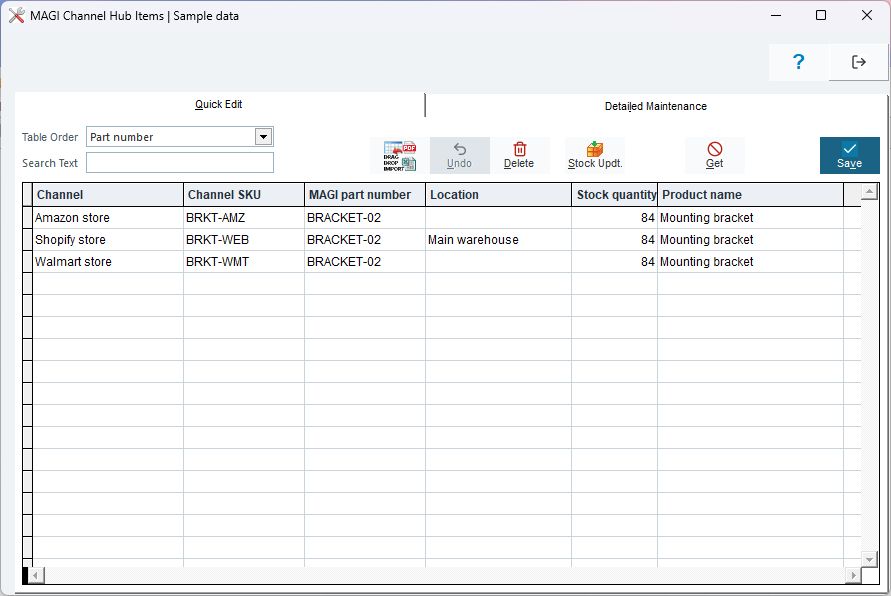
The challenge is to retain the differences that matter while avoiding a separate operating system for each channel. Customer-specific wholesale terms should remain distinct from marketplace orders. A channel SKU must resolve to the correct manufactured item or kit. The original order identity must remain usable when customer service investigates a problem.
MAGI Channel Hub supports multiple channel identities and channel-specific mappings. Its backend includes connections for Amazon, Shopify and Walmart order ingestion. MAGI then provides the manufacturing and business processes needed to work with the resulting demand.
INSIDE MAGI / ONE PART, SEVERAL CHANNEL IDENTITIES
 Open full-size screenshot ↗
The first B2C article explains the overall operating change. This guide goes further into the connection choices that deserve a deliberate setup.
02 / DEFINE THE ORDER ROUTE
Give each source order one intended path into MAGI
Draw where an order is created and every service that can pass it onward. This matters when a business uses both a direct selling-channel connection and an order-management or shipping service that also sees the same order.
ShipStation is a useful example. It can supply orders through a Hub connection, and MAGI has separate ShipStation shipping functions. If an order is available both through Shopify and through ShipStation, the design must establish the intended import route. Do not assume that two differently identified copies from different connections will automatically be recognized as one business order.
Channel Hub’s ERP import includes duplicate checks and status handling within its defined order flow. Those controls support a sound design; they do not replace a decision about which connection owns ingestion.
| Route | Document before launch |
|---|---|
| Wholesale | Customer account, pricing/terms, order-entry path and allocation policy. |
| Amazon | Seller/channel identity, product mapping, merchant fulfillment or FBA workflow, and status handling. |
| Shopify | Store, product/variant mapping, inventory location and the chosen order-ingestion route. |
| Walmart | Marketplace account, order/line mapping and the supported exchange operations for the connection. |
| ShipStation | Order-ingestion role, shipping role, carrier mappings and the owner of shipment updates. |
04 / DISTINGUISH FULFILLMENT PATHS
A parcel shipment and an FBA transfer are different work
For a merchant-fulfilled consumer order, your operation prepares the parcel and the customer needs its shipment information. MAGI’s ShipStation integration includes rate retrieval and label purchase or voiding. Channel Hub’s shipment-posting flow uses mapped carrier information and tracking data.
Amazon FBA introduces a different stock movement. Goods sent to Amazon for fulfillment need a transfer workflow and corresponding inventory treatment. MAGI includes separate FBA transfer logic. The warehouse should be able to distinguish inventory awaiting transfer, inventory sent for FBA and ordinary customer shipments.
Ask the team to follow a partial shipment and a canceled label as well as the normal parcel. For FBA, follow a transfer from the sending warehouse and identify who confirms the receiving information. These scenarios should explain the records and responsibilities, without assuming that every connection handles every operation in the same way.
05 / OPERATE THE CONNECTIONS
Make exceptions visible to a named person
A useful multichannel process includes a regular review of failed imports, unmapped items, delayed updates and shipment exceptions. Decide which conditions require immediate attention and which can wait for a scheduled review. A connection that runs unattended still needs an owner.
- Unmapped productWho resolves the channel SKU and verifies the intended MAGI item or kit?
- Changed or canceled orderWho checks whether inventory or warehouse work has already been committed?
- Failed inventory updateWho examines the last successful exchange and the current selling exposure?
- Shipment mismatchWho verifies quantity, carrier and tracking before posting the update?
- Return or payout differenceWho reconciles physical goods and financial records without assuming they are the same event?
Use these scenarios when evaluating a first ERP or replacing an existing system. The demonstration should show the supported route for your channels, the settings it depends on and how the team will find and resolve an exception.
Channel Hub provides the connection work within a MAGI-centered operation. Its value becomes clear when the same product, order and inventory commitment can be followed from the selling channel through fulfillment and the business records.
Sources & article notes
Prepared by MAGI Manufacturing Insights with AI-assisted research and writing. Product coverage was checked against MAGI information and available software evidence. Numerical examples are illustrative, not customer results. Available options depend on the implementation. Read our editorial process.