
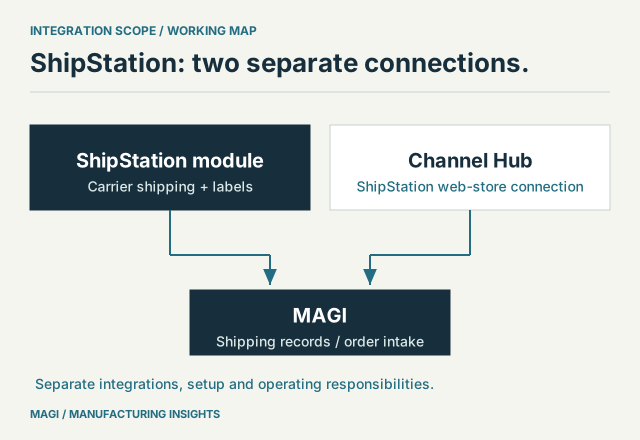
01 / THE CONNECTION INVENTORY
Which applications can MAGI connect to?
MAGI connects manufacturing operations with online sales, shipping and other business applications. The ShipStation module provides an integrated carrier shipping and label workflow. Channel Hub separately connects Amazon, Shopify, Walmart and ShipStation web-store orders with MAGI. Other interfaces support invoice exchange with Avalara AvaTax and configured EDI customer-order processing.
For a manufacturer evaluating ERP, the useful comparison is what each connection accomplishes: which records move, in which direction, under whose control. This overview was reviewed on November 8, 2026. Confirm the required modules, provider accounts and transaction scope for your implementation.
Scroll the table to see all columns →
| Application or route | Business purpose and direction | Setup to establish |
|---|---|---|
| Amazon through Channel Hub | Bring eligible marketplace orders into the MAGI order workflow through the hub. | Seller account, channel and item mappings; distinguish merchant fulfillment from Amazon fulfillment requirements. |
| Shopify through Channel Hub | Connect store orders and product mappings with MAGI; location-specific item records provide targets for inventory updates. | Store, channel SKU, MAGI part and Shopify inventory location. |
| Walmart through Channel Hub | Bring eligible marketplace orders through the hub into MAGI, including their line items and delivery details. | Seller account, item mapping, accepted order statuses and fulfillment responsibilities. |
| ShipStation module | Integrated carrier shipping: send shipment information for rates and label purchase; bring label and tracking references back to MAGI. | The appropriate shipping API account, enabled carriers, services, package details and label format. |
| ShipStation web-store connection through Channel Hub | A separate integration for bringing web-store orders from ShipStation through Channel Hub into MAGI. | Which system first owns the order and how to avoid importing it through two routes. |
| Avalara AvaTax | Send eligible MAGI invoices to the configured tax service and handle its responses. | Tax-service module, company/account settings, transaction configuration and exception ownership. |
| Configured EDI interfaces | Receive customer-order transactions using trading-partner and transaction mappings. | Partner identifiers, document maps, posting rules and the handling of rejected or delayed transactions. |
These routes serve different purposes. Agree the required order, inventory and shipment operations separately for each selling channel. A connection list should lead to a transaction demonstration using your requirements.
02 / ONE ITEM, SEVERAL CHANNELS
Channel Hub connects channel identities to MAGI's operating records
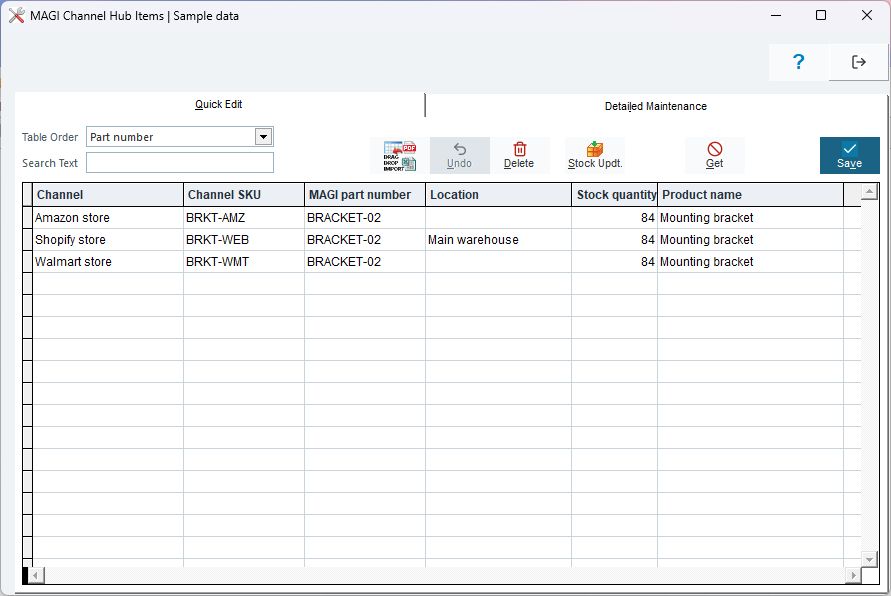
A manufacturer may sell the same bracket under different online SKUs while purchasing, producing and stocking it under one internal part number. Channel Hub's item mapping keeps those identities connected. The Shopify mapping also needs the inventory location associated with the item.
INSIDE MAGI / CHANNEL HUB ITEMS
 Open full-size screenshot ↗
The repeated quantity of 84 in this sample represents shared availability. It does not represent three separate inventories of 84 units. MAGI calculates channel availability using the configured warehouses, eligible stock and allocations, then sends inventory through the inventory-update process. Establish update timing and exception handling before relying on that quantity to make customer promises.
Order intake has its own controls. The standard Hub import checks item mappings and existing Hub order identifiers, separates canceled orders, and filters order statuses. Unmapped items need attention before the affected order can proceed. Test an unfamiliar SKU and a repeated order during acceptance, alongside a normal order.
For the wider operating changes involved in consumer sales, see manufacturers entering B2C. Manufacturers serving distributors as well should also examine wholesale and direct-to-consumer order requirements.
03 / THE SHIPSTATION MODULE
Integrated carrier shipping and labels, with a separate web-store connection
The ShipStation module means MAGI's integrated carrier shipping and label workflow. It uses shipment and package information to request rates, lets the operator select an appropriate service, and supports purchasing a label and storing returned label and tracking references. Carrier choices, package requirements and response errors remain part of the shipping workflow.
The ShipStation web-store integration through Channel Hub is completely separate. It can bring web-store orders from ShipStation into MAGI through the hub. Decide whether a given order enters through its marketplace connection or through ShipStation, and preserve its external reference for reconciliation. Setting up that order route is distinct from implementing the carrier shipping module.
ShipStation distinguishes its application APIs from the standalone ShipStation API, formerly ShipEngine. The account and credentials must match the route being implemented. An existing ShipStation application account should not be treated as automatic access to every shipping API.
A useful shipping acceptance case: follow one packed order into rating, choose a service, produce the agreed label in the test environment, and trace the returned tracking reference. Then test an invalid package or service combination. Agree who resolves it and what prevents premature shipment confirmation.
04 / OTHER BUSINESS EXCHANGES
Tax-service and EDI connections have their own controls
MAGI's Avalara interface includes a process for sending eligible invoices to AvaTax after the applicable posting stage. It checks configured access, prepares transaction data and records response failures. Successful processing clears the invoice's pending transmission indicator. During implementation, define who reviews failures and reconciles the invoice with the tax-service record.
Avalara's transaction documentation distinguishes estimates from recorded transactions and places restrictions on changing transactions already reported through a filing service. That is a reason to agree the transaction lifecycle and correction process, rather than treating every tax request as interchangeable.
EDI addresses another set of requirements: a customer's document conventions and the manufacturer's order-processing rules. MAGI's inbound processing uses trading-partner and transaction mappings, separates errors from transactions held for later posting, and supports resubmission. A partner's order must be interpreted correctly before it becomes an operating commitment.
Use actual partner specifications and representative test documents. Identify item-number translations, units, dates, ship-to identifiers and change-order rules. Acceptance should include a rejected document and its corrected resubmission, as well as a clean first import.
05 / SCOPE THE NEXT CONNECTION
How can MAGI connect another application?
Start with the transaction the business needs to exchange. An additional connection may use an existing interface, a configured file exchange or a scoped development project around an application's supported API. MAGI's integration workflows also include extension points for adapting defined processing steps. The appropriate approach depends on the application's interface and the operating controls that must remain in place.
For example, a proposed connection to a separate service application might bring an approved demand record into the manufacturing workflow. The scope must establish the item, quantity, required date and customer, then define what happens when the service application changes or cancels that record. The presence of an API alone does not settle those business decisions.
Document which behavior is available now, which setup is required and which work is new. Include responsibility for provider changes and ongoing support. These connections can also contribute to the practical Industry 4.0 operating map when they deliver information to a defined manufacturing decision.
06 / PREPARE A USEFUL DEMONSTRATION
Bring one transaction and its hardest exception
- Purpose: the business decision or manual handoff the connection should improve.
- Ownership: the authoritative system for the order, item, quantity, status and customer promise.
- Mapping: identifiers, units, locations and required fields on both sides.
- Timing: the trigger, frequency and acceptable delay for each direction of exchange.
- Recovery: handling for duplicates, rejected records, outages, corrections and retries.
- Acceptance: the expected records, totals, approvals and final status for the example.
For a MAGI demonstration, bring your application list and a representative transaction that exposes an important business rule. MAGI's business consulting is included in onboarding and available for ongoing work with MAGI customers. Use that discussion to establish the connection scope, operating responsibilities and implementation work your manufacturing business needs.
Include the employee who will use the connected information. Follow a normal handoff, then a failed or incomplete one. The acceptance test should establish how that person finds the problem, corrects the cause and confirms the final result without creating a duplicate. This is where integration can help daily work, beyond the technical fact that two applications exchanged a record.
When an incoming record changes what people must do next, use the MAGI workflow customization worksheet to define the operator steps, approval requirements and expected business result.
Sources & article notes
Prepared by MAGI Manufacturing Insights with AI-assisted research and writing. Product coverage was checked against MAGI information and available software evidence. Numerical examples are illustrative, not customer results. Available options depend on the implementation. Read our editorial process.