
01 / THE OPERATING QUESTION
What does Industry 4.0 mean for an established manufacturer?
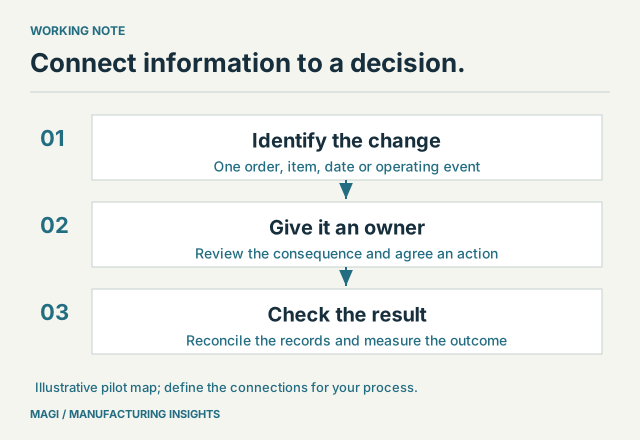
Industry 4.0 describes the use of connected digital systems, operating data and automation to improve manufacturing decisions and execution. For an established manufacturer, a useful starting point is one recurring decision: what to make next, which material to expedite, or what delivery date to promise. Connect the information needed for that decision, assign responsibility for acting on it, and measure whether the result improves.
The technologies can include industrial sensors, machine connectivity, analytics, robotics and simulation. ERP provides another important part of the picture: the relationship between demand, inventory, production, purchasing and delivery. NIST includes system integration and ERP among the foundations of Industry 4.0. A machine event becomes more useful when the business can relate it to an item, an order and a consequence for the customer.
That gives an ERP-aware manufacturer a practical way to evaluate the opportunity. Begin with an operating problem your team recognizes, then identify the information and connections that would help resolve it.
02 / FOLLOW THE HANDOFFS
Map one order from demand to delivery
Consider an illustrative manufacturer whose customer moves an assembly order forward. The planner must establish whether components can arrive in time, purchasing must confirm any changed commitments, and the shipping team needs an achievable release date. A connected process should make that sequence traceable.
Scroll the table to see all columns →
| Handoff | Information to connect | Decision and evidence |
|---|---|---|
| Customer demand → planning | Order, item, quantity and requested date | The planner can identify the changed requirement and its source. |
| Planning → material supply | Usable stock, existing commitments and dated receipts | A shortage or timing conflict can be explained using the same assumptions. |
| Material supply → purchasing | Supplier commitment, lead time and proposed action | The buyer records whether a receipt can move and follows the required approval process. |
| Production → fulfillment | Actual progress, completed quantity and release status | The person promising shipment can distinguish expected output from goods ready to ship. |
| Fulfillment → customer service | Shipped quantity, shipment reference and remaining balance | Customer service can explain what left and what remains open. |
This is a proposed acceptance map, not a claim that installing a connector completes every handoff. For each row, name the record owner, the update timing and the person who handles an exception. If two systems disagree about whether an order is released, decide which record governs before automating the exchange.
Our guide to MAGI application integrations examines specific connections. The map above answers a different question: what should the business be able to do once the information arrives?
03 / INSIDE THE DECISION
Give connected data an operating destination
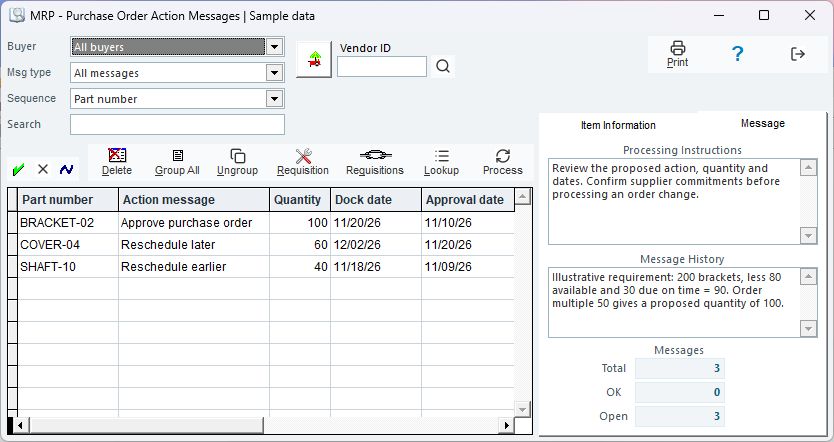
MAGI's purchase-order action-message review illustrates this principle. It brings the proposed action, part, quantity and relevant dates into a review used by the purchasing and planning team. The workflow includes supply-and-demand lookup and processing through the existing purchasing operations. A recommendation still needs to be understood in the context of supplier commitments and the business's controls.
INSIDE MAGI / PURCHASE ORDER ACTION MESSAGES
 Open full-size screenshot ↗
Read the sample rows as decisions with different consequences. One proposes approval of a purchase order; another proposes moving a receipt later; a third proposes moving it earlier. The dates and quantities help the buyer establish what needs attention. They do not establish that a supplier has accepted a change.
For an Industry 4.0 project, apply the same discipline to every additional signal. If a production update indicates that a job will finish late, specify which planning review receives that information, who evaluates it and how the revised commitment reaches customer service. The MRP worked example explains how material assumptions affect a recommendation.
04 / A BOUNDED FIRST PROJECT
Choose a pilot with a measurable decision
A useful first pilot might address late component receipts for one product family. The objective could be to reduce the time between a changed supplier commitment and an informed production decision. Agree the baseline with the people doing the work, using actual records rather than an assumed improvement percentage.
Include the employee experience in that baseline. Does the connection put useful information into the planner’s existing decision, or create another place the team must monitor? Observe repeated entry, time spent locating an answer and unclear exception ownership. Agree what an improvement would look like before extending the pilot.
Define a start and an end. For example, the clock starts when purchasing records the revised receipt date and ends when planning has reviewed the affected demand and recorded its response. Keep separate measures for data arrival, review and execution. A fast interface can coexist with a queue of unreviewed exceptions.
Use a deliberate exception: move a receipt beyond the assembly date, then restore it. Ask the team to trace both changes, identify the affected requirement and explain the action taken. Record what happens if the update is missing, duplicated or arrives after someone has already changed the plan.
Also test a normal day. Operators should be able to complete routine work without maintaining a second unofficial record just to make the pilot appear successful. The implementation readiness checklist provides a broader framework for rehearsal and ownership.
05 / THE NEXT CONNECTION
Use the operating map to scope equipment and application connections
MAGI's existing order, inventory and planning workflows provide useful starting points for connected operations. Channel Hub adds connections to online selling channels, while other interfaces address shipping and business applications. The next step is to identify the information a particular operation still needs.
An equipment-monitoring or manufacturing-execution connection, for example, could be scoped to provide completion or downtime information for a defined work center. Before deciding how it should affect MAGI, establish the equipment identifier, corresponding operation, units, timestamps and correction procedure. A machine count may include scrap, rework or trial pieces; agree what constitutes a reportable completed quantity.
Evaluate the available interface, access permissions, update frequency and recovery procedure with the application or equipment provider. Treat a proposed connection as scoped implementation work, with an agreed test and maintenance owner. This keeps future opportunities tied to a usable manufacturing process.
06 / ACCEPTANCE BEFORE EXPANSION
Use a short scorecard before extending the pilot
- Identity: each event can be tied to the correct item, order, location or operation.
- Freshness: the team knows when the information was updated and whether it is recent enough for the decision.
- Control: the agreed review, approval and release responsibilities still apply.
- Exceptions: missing, duplicate and rejected updates have a visible owner and recovery process.
- Reconciliation: quantities and statuses can be explained across the connected records.
- Business result: the team can compare the chosen measure with its recorded baseline.
Bring that scorecard to a MAGI demonstration with one representative order and one difficult exception. MAGI combines manufacturing software with business consulting included in onboarding and available for ongoing improvements. For a manufacturer adopting or expanding MAGI, that creates a practical setting for deciding which connections and workflow changes deserve priority.
A practical starting point for dependable operating data is shop-floor labor and output collection. Define the event, its validation and its destination before expanding the connected process.
Sources & article notes
Prepared by MAGI Manufacturing Insights with AI-assisted research and writing. Product coverage was checked against MAGI information and available software evidence. Numerical examples are illustrative, not customer results. Available options depend on the implementation. Read our editorial process.