
01 / THE OPERATING QUESTION
What can manufacturing ERP workflow customization change?
MAGI customization includes real changes to the running application. A consultant or trained customer employee can maintain supported transaction definitions and configuration on the fly, using the tools built into MAGI. This gives the business a practical way to adapt daily work after go-live.
MAGI workflow customization can adapt shop-floor and RF transactions to the sequence in which people identify material, scan locations, enter quantities and confirm work. It can also address the processing and checks behind those steps, and how sales and purchase orders move through approval and release. The starting point is the operating task and its effect on inventory or orders.
That matters when an established manufacturer or distributor already has a disciplined process that a replacement ERP must support. A material handler may move a partial container to a production cell. A shipping operator may need to verify an allocated order before confirmation. Purchasing may need approval from a person with the appropriate authority. Each task combines operator input with a business consequence.
This is a practical route to ease of use in a complex operation: shape the transaction around the employee’s job, with the information and prompts they need at each step. The useful evaluation question is specific: can the intended person complete the task in the right sequence while retaining the controls that make its result trustworthy?
02 / START AT THE POINT OF WORK
Design the RF transaction around the operator's task
RF, or radio-frequency, transactions support work using connected scanning equipment. In MAGI, transaction definitions identify the working record and the field layout used by a transaction. Field definitions supply input behavior and validation. This gives consultants and trained customer employees concrete places to adapt the operator's sequence and connect it to the existing business operations.
For an inventory move, the choices may include identifying a part or inventory license, confirming the source location, entering the quantity and identifying the destination. A license is an inventory identifier used to distinguish the material being handled. The appropriate sequence depends on the labels and handling practice in your operation.
INSIDE MAGI / RF OPERATION LOGON
 Open full-size screenshot ↗
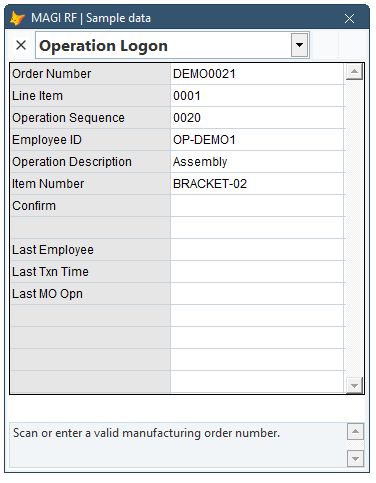
The supplied Operation Logon transaction is a concrete example: identify the order, line, operation and employee, then confirm the work. The operator uses task-focused prompts while MAGI records the job association and transaction time. Its companion Operation Logoff transaction handles production quantities, scrap and completion choices. The RF shop-floor data collection guide follows that workflow and explains which timing and posting rules need to be established.
For a customization discussion, start with the operator's actual scans and decisions. Which identifier is available first? Which information can the selected job supply? What must be confirmed before processing? A consultant or trained customer employee can adapt the supported transaction definitions around those answers while retaining applicable permissions, validations and native business operations. Field layouts and behavior are read from the configured definitions when the transaction loads. See the working RF picking customization: move the destination ahead of the picking inputs, process from the final quantity entry, and verify the resulting inventory movement and staged order allocation in an isolated sample. The compact RF screen and its field layout should be tried on the intended handheld scanner as part of acceptance.
03 / ONE CONCRETE SCENARIO
Prove a partial move from storage to a production cell
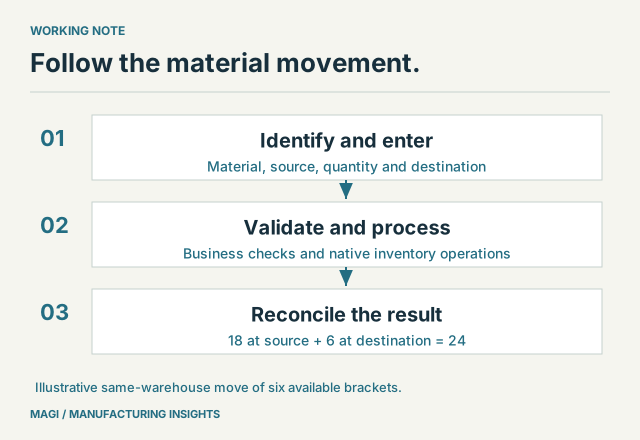
Use this illustrative acceptance scenario: 24 available brackets are in location A-01, and a material handler moves 6 to CELL-2 in the same warehouse. Assume ordinary available stock, an initially empty destination for this item, and no special consignment or direct-to-work-in-process processing.
The expected result is 18 brackets at A-01 and 6 at CELL-2, with 24 still held across the two locations. That numerical check is simple enough to explain at the workstation and precise enough to catch a wrong quantity or destination.
MAGI's movement path checks source and destination information, item or license identity, quantity and transaction date before invoking its inventory movement operation. The underlying operation handles the inventory records, locking and applicable allocation behavior. Adapting the scan sequence should preserve those checks and the established inventory processing.
Test the exception as well: scan an invalid destination, request an unavailable quantity and interrupt the task before its final processing step. Agree what the operator sees, whether anything has posted and how the task can be resumed without a second unintended movement.
Then distinguish a movement from a manufacturing issue. Moving stock to a cell changes where it is held. Issuing it to a manufacturing order connects consumption to the order and, where applicable, its operation. MAGI's RF material-issue path carries that order, item, location, lot and quantity context into the native issue process. The inventory availability guide explains why location and commitments matter beyond a total on-hand number.
04 / EXTEND THE OPERATING MAP
Apply the same discipline to picking, shipping and order approval
For pick, pack and ship, document the exact point at which an order is allocated, material is identified, package contents are checked and shipment is confirmed. Bring partial picks, substitutions, multiple packages and a held order into the demonstration when they apply to your business. These are acceptance requirements to evaluate and scope, not assumptions that every installation uses the same fulfillment process.
MAGI's allocated-shipment confirmation path includes validation and extension points before the established shipment-posting operation. The implementation should preserve the relevant account, date and order checks while adapting the task to the way your team works. Demonstrate the existing transaction and the live configuration or customization tools used to adapt it. Identify the person who will maintain those definitions and separately scope any capability that actually requires new development.
Office workflows need the same treatment. MAGI purchase approval supports configured signature limits and escalation to designated approvers. Sales-order approval checks the user's approval authority, held-order permissions and relevant engineering conditions. Review the applicable settings and order types rather than assuming one universal approval rule.
Connect these decisions to the wider application integration map when another system supplies an order or shipping information. An imported record still needs an agreed route through your business controls.
05 / A WORKSHEET FOR THE DEMO
Specify the input, control and result for each step
Scroll the table to see all columns →
| Question | Material-move example | What to prove |
|---|---|---|
| Who performs the task? | Authorized material handler. | The person can reach the permitted transaction. |
| What is scanned or entered? | Material identifier, source, quantity and destination. | Prompts follow the agreed physical handling sequence. |
| What makes the work easier? | A scan sequence that matches the available labels and the physical move. | The operator understands the prompts; unnecessary re-entry is identified and addressed in the agreed scope. |
| What must be checked? | Correct item, valid locations, usable quantity and date. | An invalid input produces a useful response. |
| When does processing occur? | At the agreed completion step. | The operator can distinguish an unfinished entry from a completed move. |
| What changes? | Source decreases by 6; destination increases by 6. | Inventory records reconcile to the expected result. |
| Who resolves an exception? | A named warehouse or production supervisor. | Recovery is documented and does not duplicate the transaction. |
Keep the worksheet with the implementation acceptance record. Include the normal task, the difficult exception, ownership of the change and how it will be checked after an update. Our live configuration and customization guide shows how a consultant or trained customer employee can maintain supported changes; this worksheet makes the operational requirement testable.
06 / BUSINESS FIT AND SUPPORT
Bring the workflow your next ERP must preserve
MAGI combines manufacturing ERP with business consulting included in onboarding and available throughout the customer relationship. Its implementation approach includes identifying process gaps and tailoring the product and process. Establish who will maintain live configuration and application customizations, what training they need and how continuing support works. Identify any new development separately when a requirement calls for it.
Bring one shop-floor transaction, one fulfillment exception or one order-approval path to a MAGI demonstration. Walk through it with the people who perform the work, then inspect the resulting records. That is a useful basis for evaluating manufacturing depth, employee ease of use and a supported fit with your business. Identify which parts of the current process help people work effectively and which make them work around the software.
Sources & article notes
Prepared by MAGI Manufacturing Insights with AI-assisted research and writing. Product coverage was checked against MAGI information and available software evidence. Numerical examples are illustrative, not customer results. Available options depend on the implementation. Read our editorial process.