
01 / DEFINE THE WORK
Start with an order your team recognizes
An ERP evaluation becomes consequential when one order crosses engineering, planning, purchasing, production, shipping and finance. An established manufacturer may already have a system, yet still depend on disconnected records or manual handoffs for important decisions. The evaluation needs to show how the whole operating process will work.
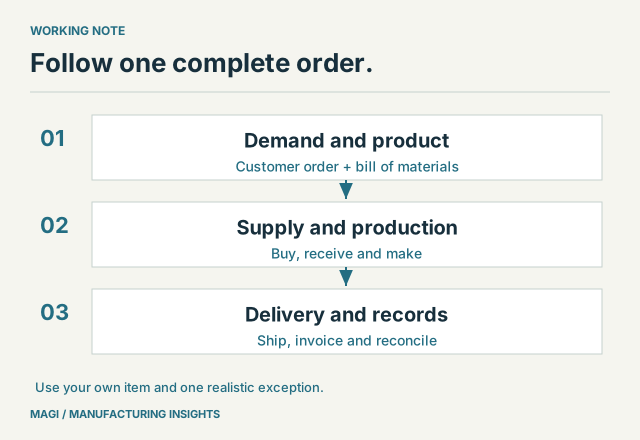
A long feature checklist is a difficult place to start. Choose one manufactured item and follow a typical customer order from entry to shipment and invoice. Include the purchased components, the work performed internally and any outside service. Ask each person to show the record they use and the decision they make.
For example, an assembly manufacturer receives an order for 40 units. It has enough housings but not enough brackets, one operation uses a shared machine, and the customer needs a confirmed delivery date. That single order touches product definition, inventory, purchasing, production, scheduling, shipping and accounting. It is a better demonstration script than a tour of unrelated screens.
02 / IDENTIFY THE RECORDS
Decide which facts need a common home
ERP connects work through shared records. Before comparing systems, list the facts that must agree and identify who is responsible for maintaining them. This exposes both software requirements and decisions the business still needs to make.
| Record | Question to resolve |
|---|---|
| Item | What is the identifier, unit of measure and purchasing or manufacturing policy? |
| Bill of materials | Which revision applies, and how much of each component is required? |
| Inventory | Where is it, what is committed, and what is unavailable for use? |
| Open supply | What is due from a vendor or production order, in what quantity and on what date? |
| Customer order | What was promised, what changed, and what remains to ship? |
| Cost and accounting | Which transactions establish the cost, invoice and outstanding balance? |
A spreadsheet may remain useful for analysis. The important decision is whether a workbook is also acting as the only record of an operational commitment. If changing it affects what someone buys, makes or promises, the replacement workflow needs an explicit owner and a dependable update path.
03 / TEST A DECISION
Make the demonstration include a shortage
Have the demonstrator enter the 40-unit order with a shortage of brackets. Ask to see the requirement, existing stock, outstanding purchase supply and the date on which the parts are needed. Then change the receipt date. Watch how the person using the software discovers the problem and decides what to do.
This is where terminology becomes useful. A bill of materials explains the components. MRP turns demand, stock, scheduled supply and planning policies into material requirements. Scheduling considers the work and resources needed to produce the order. Each contributes an answer; none removes the need for accurate records.
For the financial side of the same order, use the planned-versus-actual costing example to follow costs back to quantities and rates.
MAGI’s documented scope includes bills of material and routing, inventory, MRP, purchasing, shop-floor control, scheduling, order processing and accounting. Its purchasing process includes review and approval steps. Evaluate how those functions work together for your order, including who has authority to change or release it.
Write down the result: “The planner can see that brackets arrive after the planned assembly start, and can review the purchase-order action.” That is an observable requirement. “Better visibility” is too broad to tell you whether the demonstration succeeded.
04 / PREPARE A SMALL DATA SET
Bring enough detail to expose the hard parts
You do not need to clean the entire business before a first demonstration. A small, representative set is more useful: one item and its components, a current bill of materials, several stock locations, one vendor, a customer order and a recent production example.
Include the details that complicate daily work. Perhaps the vendor sells a box while the bill of materials consumes individual pieces. Perhaps a coating operation is subcontracted, a component changes with the revision, or a customer asks for partial deliveries. Those details should influence the selection before the contract is signed.
Ask which data can be converted, which needs cleanup and which must be established as a new operating rule. Item numbers, units, duplicate vendors and obsolete revisions deserve attention early. Software cannot infer the correct business meaning of inconsistent source data without decisions from your team.
05 / COMPARE THE FIT
Use a short list of demonstrated outcomes
Manufacturing ERP demonstration checklist
0 of 5 checked. Your checks stay on this page only.
The goal is to understand how your people will complete the work and keep the records reliable. This also applies to a first integrated ERP when the operation needs coordinated manufacturing control and is prepared to invest in implementation. MAGI includes business consulting in onboarding, with ongoing consulting available to customers as their processes change. Read the worked MRP example to prepare planning questions, then use the implementation checklist to organize the move into MAGI.
Sources & article notes
Prepared by MAGI Manufacturing Insights with AI-assisted research and writing. Product coverage was checked against MAGI information and available software evidence. Numerical examples are illustrative, not customer results. Available options depend on the implementation. Read our editorial process.