
01 / TWO FEASIBILITY CHECKS
Material availability does not reserve machine time
A production order can have every component available and still miss its planned date because the required machine is occupied. The reverse also happens: time is available on the schedule, but the material is not ready to use.
Production scheduling software should help a manufacturer bring those constraints into the same planning discussion. The useful questions are specific: which operation can start, which resource will perform it, how long will it occupy that resource, and what must happen before it can begin?
Start an evaluation with a work center that people recognize as a constraint. A small example will reveal how capacity, calendars and priorities affect the schedule more clearly than a board containing hundreds of unexplained orders.
02 / A CAPACITY EXAMPLE
Nine hours of work cannot fit into eight usable hours
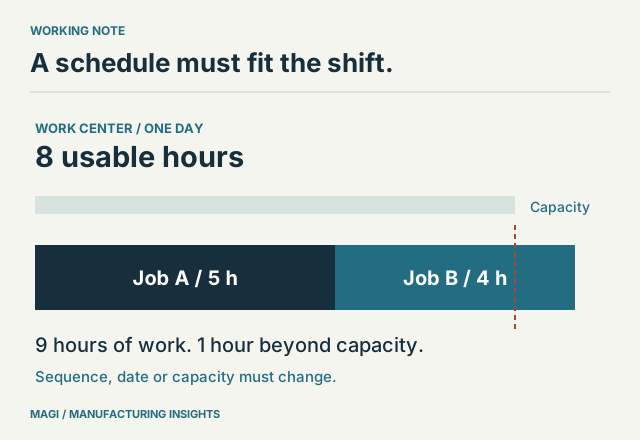
Assume a work center has eight usable machine-hours on a particular day. Job A needs five hours and Job B needs four. The estimates already include the setup time relevant to this example. There are no parallel resources and no authorized overtime.
The load is nine hours. The capacity is eight. One hour of work must move, the sequence or resource assignment must change, or additional capacity must be explicitly made available. A scheduling method can expose or arrange that conflict; it cannot make the arithmetic disappear.
| Approach | What it helps reveal | What still needs review |
|---|---|---|
| Infinite loading | Required work against the requested dates, including overload. | How the overload will be resolved before the plan becomes a commitment. |
| Finite scheduling | A sequence or timing constrained by the modeled resource capacity. | Whether the capacity, standards, priorities and material assumptions are correct. |
Neither approach is universally the right choice for every work center. A business may want a constraint-sensitive plan at a bottleneck and a broader load view elsewhere. What matters is understanding the question each view answers.
03 / MAINTAIN THE MODEL
Calendars and standards determine what the plan can mean
A usable calendar must reflect the resource’s working and nonworking periods. Planned downtime, resource availability and shift assumptions affect the time available for work. A routing standard that no longer reflects production will distort the load even if the calendar is accurate.
MAGI supports finite and infinite scheduling choices by work center, with calendars, capacity and priorities. Its scheduling functions connect with MRP and shop-floor control. Actual scheduling logic includes resource time blocks and nonworking periods, which is why an accurate resource calendar deserves attention during setup.
Use a second version of the example with one hour of planned downtime. Then delay a material receipt. Ask where each change is visible and which orders are affected. Keep the reasons separate: lost capacity is different from a job waiting for components.
Also ask how completed work and remaining work update the view. A schedule that only knows original estimates can diverge from the shop as orders progress. The data-collection process needs to be practical for the people recording production. Those reported quantities and times also matter when comparing planned and actual manufacturing costs.
04 / HANDLE A CHANGE
Show the consequence of an expedited order
Introduce Job C after the initial schedule is understood. Give it an urgent requirement, but use the same constrained resource. Ask the demonstrator to explain the change in sequence and identify the work displaced by the new priority.
This exercise exposes an important operating rule: who can change a priority, and who communicates a changed commitment? If every department can independently mark its work urgent, the software receives conflicting instructions.
MAGI’s published scheduling scope includes a schedule board and simulation. Use those views to compare alternatives and inspect their effects. Avoid assuming that a proposed schedule has automatically optimized every business objective. Due dates, setup effort, material availability and resource use can compete with one another.
A useful decision record: the changed priority, the resulting sequence, the orders affected and the person who authorized the adjustment. This gives sales and production the same explanation.
05 / EVALUATE YOUR BOTTLENECK
Bring a small set of competing orders
- Resource modelShow the work center, its usable calendar and any parallel resources.
- Work contentShow setup/run assumptions and the remaining operation time.
- Material readinessIdentify the components and outside operations required before work starts.
- Priority changeExpedite one order and explain the consequences for the others.
- Production feedbackShow how actual progress changes the remaining schedule.
The objective is a schedule the planner and shop can interpret and maintain. For the material side of the same example, read MRP explained. If the review is part of a replacement project, include the scenario in your ERP comparison record.
Sources & article notes
Prepared by MAGI Manufacturing Insights with AI-assisted research and writing. Product coverage was checked against MAGI information and available software evidence. Numerical examples are illustrative, not customer results. Available options depend on the implementation. Read our editorial process.